 IOC Triage
Investigate any IOC in one right-click.
IOC Triage is a free browser extension for SOC analysts. Select an IP, domain, URL, file hash or CVE on any page, in Securonix, SentinelOne, HaloPSA or a raw log, and get an explainable verdict from 15 threat-intel sources, with what to do next and a ready ticket note.
Built for L1 and L2 analysts
Less tab-hopping and copy-pasting: the checks an analyst does by hand for every alert, in one place.
Right-click → Investigate
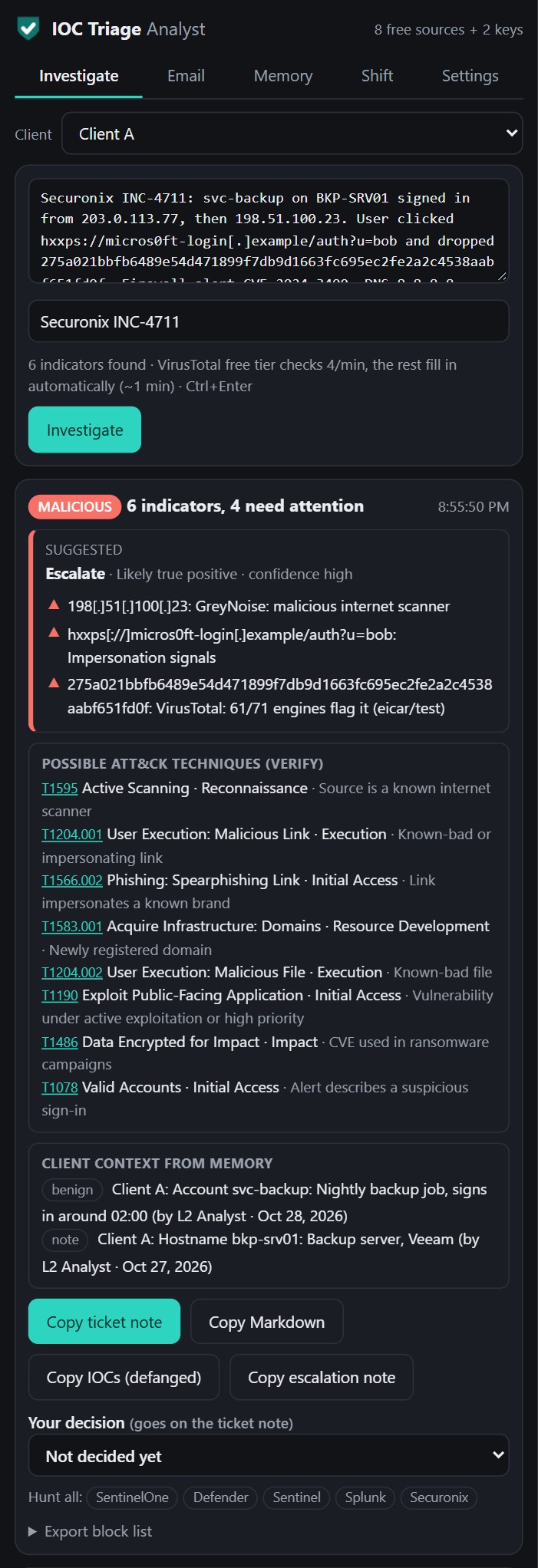
Paste or select anything, even a whole alert or defanged log line. Every indicator gets a verdict, a confidence level, plain-English reasons and next steps.
Explainable verdicts
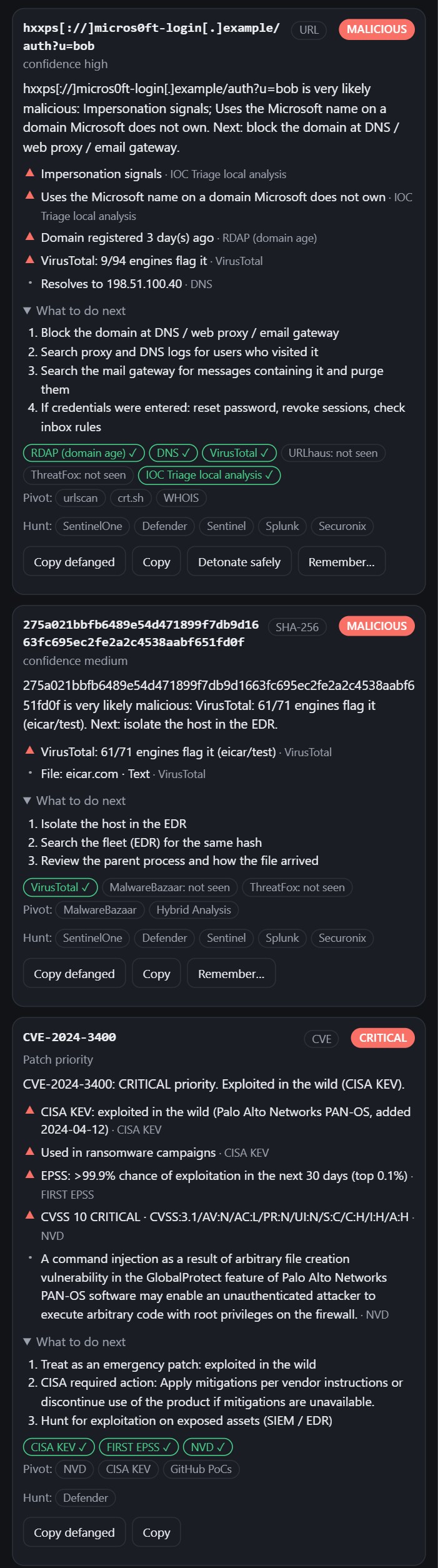
Every verdict shows which source said what (VirusTotal, AbuseIPDB, GreyNoise, CISA KEV…). It recognises Tor exits, lookalike domains, new registrations and known infrastructure.
One-click ticket notes
A formatted note for HaloPSA or any ticketing tool, with verdicts, findings, recommended actions and defanged indicators, in HTML, plain text or Markdown.
Email header analysis
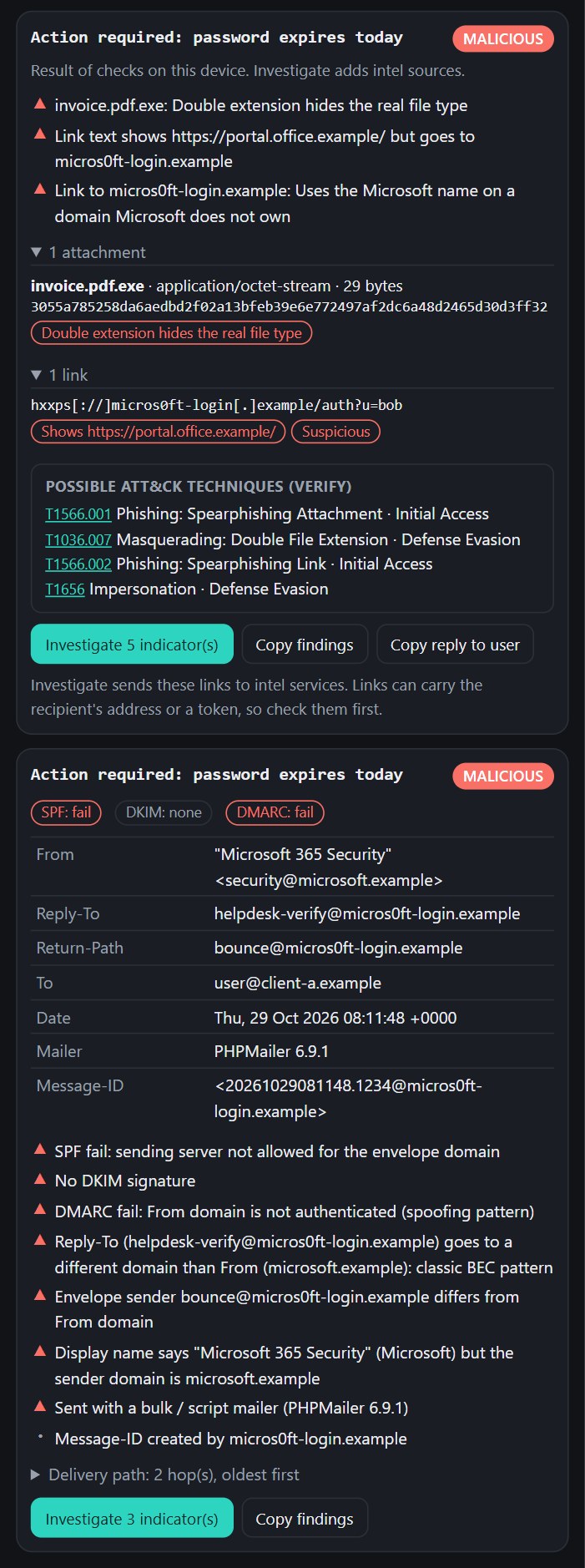
Paste headers to see SPF, DKIM and DMARC, delivery path and hop delays, the originating IP, and Reply-To and display-name tricks (BEC patterns). Fully on the device.
Client memory for MSSPs
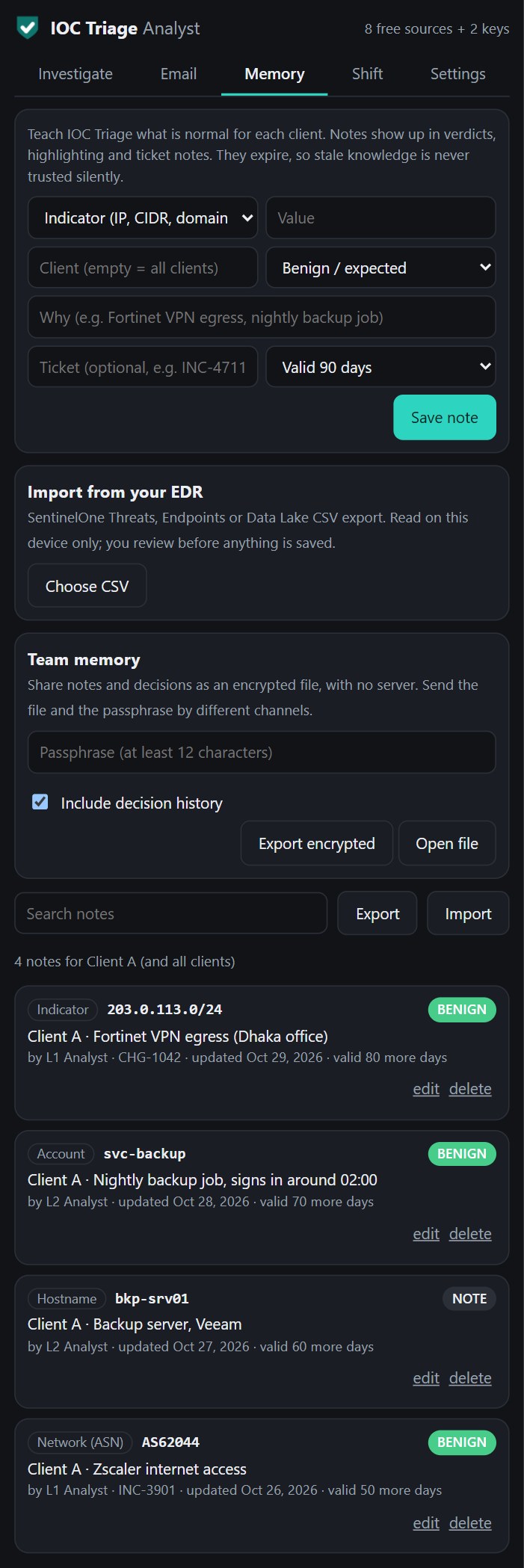
Remember what is normal per client: VPN ranges, ASNs, countries, service accounts, hostnames. Notes expire, so stale knowledge is never trusted silently.
SentinelOne import
Import Threats, Endpoints or Data Lake exports. Triaged hashes and endpoint inventory become client notes, and internal IPs map to hostnames.
IOC highlighting
Indicators on SOC consoles are underlined by client memory and past verdicts. Click one for a verdict. The console's page is never modified.
Hunt queries
One click copies a ready query for SentinelOne, Defender, Sentinel, Splunk or Securonix, for one indicator or the whole alert.
Close or escalate
A suggested decision with its reasons, and a ready hand-over note for L2. It never suggests closing when evidence is missing.
Decision memory
See what you decided last time for the same indicator and client, on the device, and turn repeat false positives into client notes.
Phishing triage
Open a reported .eml file for headers, real link destinations and attachment hashes, then copy a reply for the person who reported it. The email is never displayed.
Shift handover
A report built from your investigations and decisions, with what needs attention first.
Team memory
Share notes and decisions as an encrypted file with a passphrase. No server involved.
MITRE ATT&CK mapping
Possible techniques from the evidence, labelled as possible, on your ticket and escalation notes.
Block list export
Flagged indicators for firewalls and EDR, a Microsoft Defender CSV or STIX 2.1. You review and deploy it.
Your own AI (optional)
Connect OpenAI, Claude, Gemini, Azure OpenAI or a local model for summaries and client emails. Sends only on click, with client data masked.
Safe detonation
See a screenshot of a suspicious link through urlscan.io without opening it in your browser.
Phishing protection
Blocks fake login pages and lookalike domains, flags phishing emails in Gmail and Outlook on the web, and stops your work password being typed on other sites.
See it in action
Screenshots use sample data (documentation IP ranges, demo domains, the EICAR test file, public CVE data).
15 intel sources, your keys, your browser
Only the indicator is sent, directly from your browser to each service. There's no IOC Triage server in between.
| Needs no key | Free API key |
|---|---|
| GreyNoise · Shodan InternetDB · ipinfo · RDAP domain age · DNS · CISA KEV · FIRST EPSS · NVD · local lookalike & brand analysis | VirusTotal (free tier queued automatically) · AbuseIPDB · abuse.ch: URLhaus, ThreatFox, MalwareBazaar · urlscan.io |
Install in one minute
- Download
ioc-triage-extension-v*.zipfrom the latest release and unzip it. - Open
chrome://extensions(oredge://extensions), turn on Developer mode, click Load unpacked and pick the unzipped folder. - Select any indicator on a page, right-click, then IOC Triage: Investigate. Optional: add free VirusTotal and AbuseIPDB keys in the panel's 2-minute setup.
FAQ
Is IOC Triage free?
Yes, free and open source under Apache 2.0. Eight intel sources work with no key; VirusTotal, AbuseIPDB, abuse.ch and urlscan.io need a free key from each provider.
Does it send my data anywhere?
No IOC Triage server is involved. Everything runs in your browser. When you investigate, only the indicator goes to each intel service. Email content, passwords and browsing history never leave the device. If you connect your own AI, it receives computed evidence only when you click. See the privacy policy.
Does it work with Securonix, SentinelOne or HaloPSA?
Yes. Investigate any text you select in those consoles, highlight the indicators on them, paste ticket notes into HaloPSA with formatting kept, and import SentinelOne CSV exports into client memory.
Can my company deploy it centrally?
Yes. Settings can be pushed through Chrome or Edge policy (GPO / Intune). An optional self-hosted console adds SOC reporting, threat feeds and sign-in verification.
How does the AI work?
AI is optional and verdicts never depend on it. IOC Triage can use the browser's built-in on-device model (Gemini Nano in Chrome), which keeps everything on your machine. You can also connect your own AI: OpenAI, Anthropic Claude, Google Gemini, Azure OpenAI, a local model through Ollama or LM Studio, or any OpenAI-compatible endpoint. It runs only when you click, shows exactly what is sent, never receives your pasted alert, and masks client data by default.
Which browsers are supported?
Google Chrome and Microsoft Edge, version 116 or later.